Every way people interact, now available to agents. Nothing new for you to learn. Everything new to do.
"Spacebar is the substrate the next generation of AI products will be built on. Multi-user, multi-agent, fully live, and already at production scale"
Rajat Goel, Senior Engineer
Thinking Machines Lab
Spacebar is the shared, full-duplex workspace where AI agents see, hear, speak, remember, and act alongside humans. One multiplayer surface, one permission model, one event stream. Full-duplex by construction. Model-agnostic and lab-agnostic. Bring your in-house model. Weights stay on your hardware. Substrate, not gatekeeper. In production today, carrying paid customer workloads.
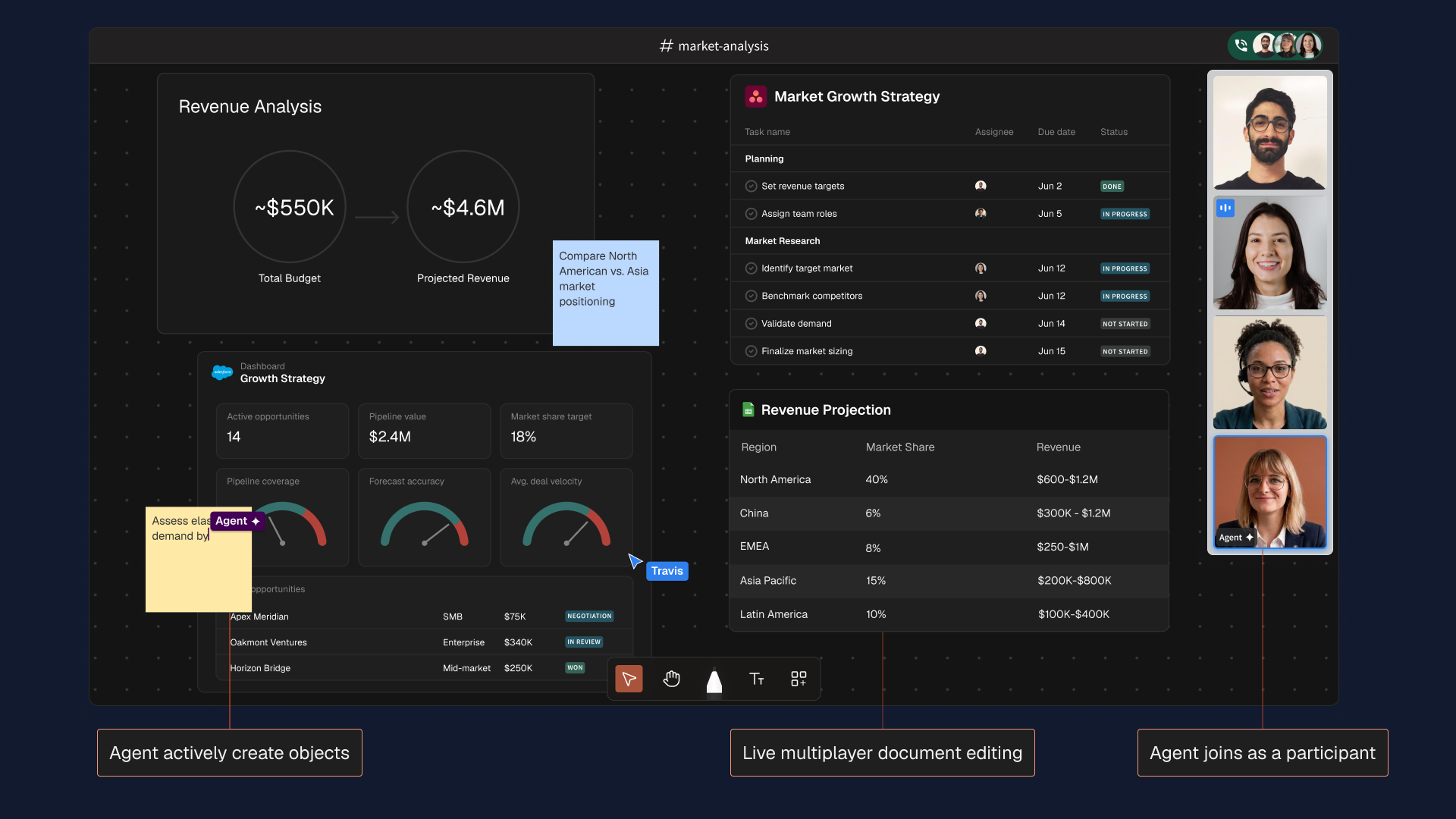
Revenue Analysis
 Market Growth Strategy
 | Task name | Assignee | Due date | Status |
|---|---|---|---|
| Planning | |||
| Set revenue targets |  | Jun 2 | DONE |
| Assign team roles |  | Jun 5 | IN PROGRESS |
| Market Research | |||
| Identify target market |  | Jun 12 | IN PROGRESS |
| Benchmark competitors | | Jun 12 | IN PROGRESS |
| Validate demand | | Jun 14 | NOT STARTED |
| Finalize market sizing | | Jun 15 | NOT STARTED |
 Dashboard
 | Apex Meridian | SMB | $75K | NEGOTIATION |
| Oakmont Ventures | Enterprise | $340K | IN REVIEW |
| Horizon Bridge | Mid-market | $250K | WON |
| Region | Market Share | Revenue |
|---|---|---|
| North America | 40% | $600K–$1.2M |
| China | 6% | $300K–$1.2M |
| EMEA | 8% | $250K–$1M |
| Asia Pacific | 15% | $200K–$800K |
| Latin America | 10% | $100K–$400K |
demand by region


.png)
The models are ready. They can reason, see, hear, and act. What they lack is a shared, stateful room to work alongside people.
A frontier model with no real surface to act on is an F1 driver in a rental car. The talent is not the constraint. The car is. A great car turns an average driver into a fast one, and an exceptional driver into a world champion.
Collaboration tools are everywhere; most now include AI. What they lack is a persistent, programmable surface where a human and an AI share context, see the same state, and act under the same rules. Notion holds the document; its AI is a sidebar. Zoom carries the conversation; its AI is a notetaker. The AI is always adjacent to the work, never intrinsic to it.
Spacebar is one synchronized space where every signal, every action, and every participant — human or model — flows into a single event stream. It is the F1 car.
.png)
.png)
The model is full-duplex.
The surface has to be too.
AI products were turn-based because the models were. Push-to-talk, wait, response. Every UI was built around that constraint. The constraint is gone. Models now stream perception and action simultaneously: hearing you while they speak, watching you while they listen, acting while they think.
A chat box with voice bolted on doesn't change the underlying loop. The user waits, the model waits, the conversation happens in turns.
That's what Spacebar is built for. Not a chatbot UI retrofitted with audio, but a substrate where every signal sits on the same stream, and every participant reads and writes simultaneously.
Full-duplex sensing
Continuous parallel streams (audio, vision, action), not discrete turns. Models can do this now. Most workspaces can't.
Persistent internal state
Somewhere to refer back to. A canvas, an event log, a memory that survives the session. Without it, the model lives one prompt at a time. With it, the model has a place to come back to.
Self-iterative action
Observe, act, observe again, in a loop that closes inside the same surface — not across tool calls stitched together by an orchestrator. The model's actions land on the same stream as every human action.
Models can perceive.
Spacebar gives them a place to remember and a loop to act in.
In production today.
The agent meets the user where they already are.
The fastest way to lose a user is to ask them to leave their workflow. Open a new tab. Install a desktop client. Sign into a new tool. Move the work into the room where the AI lives.
Spacebar's Chrome and Firefox extensions invert that. The user installs the extension; nothing else changes. Same Chrome profile, same cookies, same logged-in sessions, same 2FA. The agent comes to them: a sidebar on whatever page they're on, with structured access to the same DOM.
No remote desktop. No VM. No "share your screen." The user stays in their browser.
Onboarding cost: zero.
Environment switch: none
Time to first value: the next page load.
What the canvas is made of.
Spatial state
An infinite canvas that remembers exactly where everything is. Lay out documents, applications, browsers, whiteboard sketches, and video tiles where they belong, and they stay there. Close a space, come back a week later, and every object is exactly where it was left.
.png)
.png)
Live presence
Cursors, voice, video, and screen share sit on the same surface as the work itself. Video tiles are objects in the space, not a frame layered over it. Nothing here is a meeting tool bolted on.
.png)
.png)
Embedded software
Open web apps, desktop applications, or virtual machines directly inside a space. Server-provisioned VMs streamed over WebRTC, no install. Any number of users sharing control of one live instance.

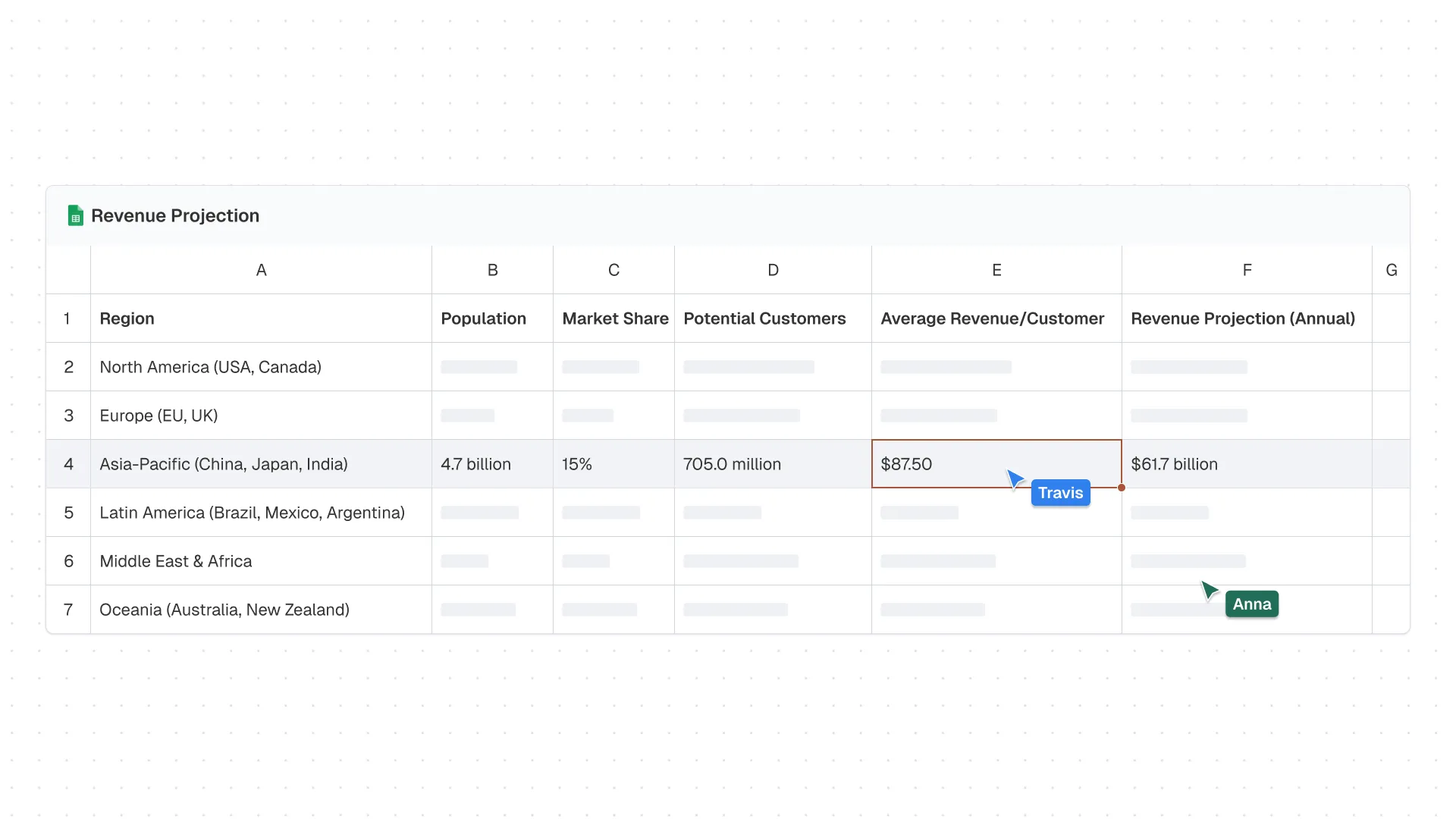
| A | B | C | D | E | F | |
|---|---|---|---|---|---|---|
| 1 | Region | Population | Market Share | Potential Customers | Average Revenue/Customer | Revenue Projection (Annual) |
| 2 | North America (USA, Canada) | |||||
| 3 | Europe (EU, UK) | |||||
| 4 | Asia-Pacific (China, Japan, India) | 4.7 billion | 15% | 705.0 million | $87.50 | $61.7 billion |
| 5 | Latin America (Brazil, Mexico, Argentina) | |||||
| 6 | Middle East & Africa | |||||
| 7 | Oceania (Australia, New Zealand) |
.png)
Programmable runtime
Every object, event, and stream on the canvas is observable and addressable through one SDK. space.objects.add(…) to write, space.events.subscribe(…) to read. Any service or agent joins the same way a person does.
room.objects.add(. )
// every event observable
room.speak(stream)
// every action addressableShared browser
A server-provisioned browser tab that the human and the agent operate simultaneously. Not a remote desktop, not a Live View onto an agent-controlled session. Both parties click, scroll, and type on the same live instance. The agent receives a continuous video feed of the human's interaction, not discrete screenshots. That signal (mouse trajectories, scroll pauses, abandoned inputs) is the telemetry that screenshot-based agents never see.
Human and agent simultaneously
Agent drives; human intervenes
Continuous video + live DOM
Discrete screenshots or a11y tree
Native browsing
Remote control
The architecture difference sits above the headless-browser primitive, not within it. Spacebar uses infrastructure like that under the hood; the distinction is in the observation and control layer built on top. Full comparison with Browserbase →
Everything a real-time agent needs.
To work multimodally (conversation, sight, action) on a single surface
Voice, video, cursor, gesture, screen share, every embedded browser, every canvas object — all on one surface, through one coherent interface. Not a stack of SDKs glued together.
To see what humans are looking at, in real time
Live, structured access to every canvas object, cursor position, embedded browser, and video feed — all observable through one consistent interface.
To hear humans, including overlapping speech, while filtering out noise
Per-participant, server-side audio streams. Full-duplex. No “release the mic” turn-taking. Noise suppression and acoustic filtering applied per stream. STT provider configurable per session, not locked to one vendor.
To read embodied and social signals
Client-side perception streams: 478 face landmarks, 21 keypoints per hand, 20+ recognized gestures, attention score, engagement signals — all derived locally, in the browser. Only the results leave the device and are made available to the agent; the video stream follows standard WebRTC routing, as in any video call.
To read drawings and sketches as data, not just as images
Every stroke on the canvas is stored as a vector object — coordinates, shape, path — directly addressable through the same SDK as any other canvas element. Drawings are structured, addressable data from the moment of creation, not pixels that need interpretation.
To act on the same surface as humans, through the same interface
A symmetric API: every canvas action a human takes is also an API call, through the same surface and the same permission model. Same interface, same rules, for any actor.
To act with bounded authority
An agent takes on the full persona of the user it represents. The same role assignments, space access, and device controls that bind a person bind it.
To remember — minutes, weeks, or months
Persistent space state, full journaled history, lossless replay: every event captured in sequence, used by the substrate to reconstruct context for the agent's memory. Short-term and long-term memory layers, active in the voice + vision agent.
To run on any model, from any vendor
Pluggable STT, LLM, and TTS providers, selected per session. No single vendor is a hard dependency; when one degrades, new sessions route to another provider.
To respond fast enough that it feels like collaboration
50 ms event propagation, p99. The latency budget belongs to the model; the canvas adds effectively none.
Two modes. One substrate.
Spacebar supports two distinct agent modes, not as features, but as first-class deployment patterns. Real-time agents join live sessions and act in the moment. Always-on agents run between sessions, on triggers, and return to a Space rather than sending a notification. Both run on the same substrate. Both are in production today.
A multimodal assistant that joins live rooms.
The agent joins a Spacebar space over WebRTC as a first-class participant, on the same surface as everyone in the space. It runs a streaming voice-activity detector against the live per-participant audio streams, transcribes each participant’s speech in real time through a pluggable provider, and watches the canvas as a live visual stream. Board images are sampled at the cadence of speaking activity, so the multimodal frame budget follows the conversation rather than being exhausted during silence. It speaks back through a pluggable streaming text-to-speech provider into the shared audio mix, and retains session memory in two tiers.
room
Watching
.webp)
.png)
The agent narrates the model as it changes.
A user opens a financial model on the canvas. The voice agent watches the cells. When a partner edits an assumption, the agent says, out loud: "You just dropped APAC market share from 18% to 15%. Revenue projection is down $12.3B. The change cascades into the terminal value on row 47." No prompt. No "explain this change." Vision sees the diff, voice narrates it, the conversation continues. Same model anyone else can run. Different substrate underneath.
24 Structured tools
Runs as a sidebar inside the canvas itself. The board image is piped into every iteration, so the model always has full visual context. Every tool routes through the same authorization layer a human action would pass through; the assistant cannot do what the user it represents is not permitted to do. It runs multi-step loops, observing the board, calling a tool, and receiving the result — until the requested change is complete or the loop depth is exceeded.
Force microphone and camera state for any participant or the entire space.
Mute everyone but one participant. Or unmute an entire space. One call.
Generate structured content onto the board and export board images to feed back into the model’s vision context.
Your model, on every surface
your users already have.
A user is on a phone, mid-task. They want the agent to help with what's on the screen — a form, a checkout, a doc. The standard answer: agent reads screenshots and guesses. Spacebar's answer: agent reads structured DOM, through the same SDK, same event stream, same permission model. Just on a six-inch surface.
.webp)
.png)
Both are production systems, not demos: evidence that a real-time multimodal agent can participate reliably in a live, multi-participant space. We built the substrate, scaled it under real customer load, and proved the cost structure holds. The numbers are measured, not modeled.
Most proactive agent products are headless monitoring loops with notification surfaces. The agent finishes and fires off a Slack message. That model works for tasks with a single output. It breaks down the moment the task is ongoing, ambiguous, or needs a human to pick up and continue it.
Most proactive agent products today are headless monitoring loops with notification surfaces. When the agent finishes, it sends you a Slack message. Spacebar is different: when your agent finishes, it has been working in a Space. You walk back into the room it was working in — the canvas already laid out, the sources already open, the draft already there. You don't read a summary of what happened. You see it.
Every morning at 7am, scan our RFP inbox and draft responses.
The agent opens the inbox, reads each RFP, checks the canvas for relevant past proposals, drafts a response, and leaves it pinned to the board — ready for your first review when you arrive.
Customer NPS drops below threshold — start the retention playbook.
The agent opens a Space, pulls the account history from the CRM, drafts a personalized outreach sequence, and flags the three most at-risk accounts with recommended next actions. No prompt required.
Monitored 12 supplier pages overnight. Flagged 3 changes. Drafted outreach for the one that matters.
You asked it to watch. It watched. When it found something real — a 7% price increase on a critical component — it logged it on the canvas, cross-referenced your contract terms, and drafted a response for your approval.
The handoff. When the agent comes back to you, it is not a notification. It is a Space with the work already laid out — sources open, canvas annotated, next steps visible. Every other proactive agent platform sends you a summary. Spacebar puts you back in the room it was working in.
Where the time goes.
Fig. 08 · where the time goes
The first two are p50 estimates, for context. The 50 ms is Spacebar’s measured p99: even the worst case clears the others’ typical case by more than an order of magnitude. Whatever a user waits on, almost none of it is the substrate.
Built for an agent to live in.
Building a system that holds live video, an embedded browser, a shared document, and a collaborative whiteboard in one synchronized space — all of it surviving a dropped connection — took five years. It is the infrastructure a real-time agent needs to see, hear, act, and remember alongside people, without adding latency, context loss, or broken permissions.
CRDT engine
A custom CRDT engine on the hot path, computing minimum binary deltas from a client-supplied state vector. Runs as a compiled native service with multi-threaded execution, process-isolated from socket I/O to keep the hot path fast under load.
Worker pool
CRDT apply and encode operations run on a dedicated worker pool, sized to leave headroom on the main loop for socket I/O.
Cache
Hot in-memory state, backed by a shared cache, backed by versioned durable storage. Versioning invalidates the hot tier whenever a snapshot lands: warm-start by design.
Compaction
Snapshot compaction runs out-of-band with cooldown to prevent cascading recompactions. The hot path never blocks on snapshot work. That is how the 50 ms p99 holds under load.
Ownership lock
Per-space ownership locks ensure one server compacts a given space at a time; ownership tracking enables failover detection. The mechanism behind reliable sharded sessions.
Desync detection
Client and server each maintain expectations about the next updates; deviation is detected within milliseconds and the system recovers without losing a single state update. An immutable mutation log captures every create, update, and delete.
Pixels lose too much.
The first wave of computer-use agents took the obvious approach: render a remote browser, ship screenshots to the model, parse pixels, predict the next click. It works in a demo. It falls apart in production.
Three failure modes show up at scale. Latency — screenshots are heavyweight and discrete; the agent is always reasoning about a frame that is already stale. Loss of state — pixels are not structure; a dropdown that opened mid-frame, a hover state that mattered, a scroll position that contextualized the next action, all flatten into one ambiguous image. No user signal — when the human is in the loop, the agent sees the outcome of an action, not the path to it. How a user navigates, hesitates, corrects course — all the signal that makes intent legible — collapses between frames.
Spacebar's shared browser uses the same headless-browser primitives the screenshot approach does. The difference is the observation and control layer built on top: continuous video, live DOM, and a structured event stream the agent can subscribe to. The model gets a feed, not a slideshow.
The model layer is converging.
The substrate isn't.
Model capability is converging: real-time APIs from Google and OpenAI, computer-control surfaces from Anthropic, tool-using agents everywhere. The substrate beneath them is not.
A real-time agent needs a persistent, permissioned, multiplayer surface to see, hear, act, and remember alongside people. Building one is a multi-year systems project. The opportunity cost is real: every month spent building this layer is a month not spent on your actual product. Spacebar is that surface, in production. The question is whether you build it or build on it.
For builders weighing the alternative
Save 18 – 24 months of infrastructure work.
For a 20-person team, this layer is a two-year build at minimum. Even with parallel workstreams and an unusually senior bench, you don't ship it in under eighteen months. Every month on substrate is a month not on your product.
What you'd need to build
You will need most of this. Even with a large team working in parallel, building it is at least two years of work. Build on Spacebar, and free that time for your product.
When you need this.
When you don't.
Not every AI product needs this layer. A voice assistant that answers a question and hangs up doesn't need a persistent canvas. A chatbot in a marketing page doesn't need a multiplayer event stream. Single-turn, single-user, no persistent state. You don't need a substrate. You need an inference endpoint.
Spacebar is built for the cases that don't fit that shape. Work that's ongoing, multi-party, browser-grounded, long-horizon, or visually structured. Conversations that have to survive a week. Two humans and an agent looking at the same thing at the same time. An agent coming back to a partial task and picking up where it left off.
Where the substrate earns its keep
— Multi-party live sessions, humans + agents on one surface
— Long-horizon work that survives a session
— Browser-grounded agents on real, live web surfaces
— Enterprise + regulated, with auditable event streams
— Visually-structured tasks where the canvas is the artifact
Where you should just hit an API
— Single-turn voice assistants (ask, answer, hang up)
— Embedded chatbots with no persistent state
— Single-user productivity tools, no cross-session context
— Headless batch agents whose output is one notification
— Anything self-contained in one prompt
Your model, your brand,
our substrate.
What you see at spacebar.ai is one shape this can take. There are others. Some frontier labs already have an opinionated app and don't want another UI on top. They want the runtime, not the front end: the same substrate that powers Pencil Spaces, running invisibly as the engine under their own product. Available to their engineers, never seen by their users.
Most conversations with a frontier lab end up at one of these three. None of them require the others.
Data partnership
Trajectory and interaction data, sourced under contract, licensed for RL and model training. Real users, real workflows, real consent. Aggregated and anonymized to spec.
Integration partnership
Your model becomes a first-class provider inside Spacebar. Pluggable LLM / TTS / STT contract, weights on your infrastructure, traffic routes to you. Your users meet your model through our canvas.
Product-surface partnership
Spacebar as the runtime under your app. Your brand, your domain, your design — our substrate, invisible. The lab's own product surface, with full multimodal collaboration built in.
If one of these is the conversation you want to have, tell us which one. Each starts the same way: a call, an architecture review, and a short paid pilot.
A space any application, service, or agent can join.
Every object, event, and stream on the Spacebar canvas is observable, addressable, and actionable through one coherent SDK. Build an app, an integration, a service, or an autonomous agent — each joins the canvas the same way a person would. The protocol is symmetric: human and agent reach the same surface through the same API. Any permission a human holds, an agent can hold. The system draws no distinction between what is available to a person and what is available to a program.
// Make any web component multiplayer in a Spacebar space.
// @pncl/mario — Spacebar's real-time SDK
import { MarioClient } from "@pncl/mario";

const space = await MarioClient.join("space_8KXq...");
space.bind(myComponent);

// every state change now syncs to everyone in the space.
// presence, CRDT conflict resolution, cursors, undo/redo,
// version history, and snapshot recovery: free.
// Observe everything happening in a space, in real time.
import { MarioClient } from "@pncl/mario";
const space = await MarioClient.join("space_8KXq...");
space.events.subscribe(event => {
// event.kind: "cursor" | "draw" | "speak" | "type"
// | "object.add" | "object.move" | ...
// event.actor, event.timestamp, event.payload
});// Drive the canvas the same way a human would.
await space.objects.add({
kind: "stickyNote",
x: 320, y: 480,
text: "Try this approach instead."
});
await space.objects.move("obj_a91...", { x: 600, y: 480 });
await space.speak({ stream: ttsStream });
await space.browser.type("doc_b14...", "Hello.");An agent built against this SDK is not integrated into the canvas. It is a participant in it, with the same reach and the same limits as the person sitting next to it.
Connect anything. In minutes, not months.
Most real-time AI platforms are rigid: the surface they ship is the surface you get. Spacebar is designed to be extended. Everything in a space — presence, state, events, audio, browser, memory — is observable and writable through the same SDK your agent uses. Adding a connector is adding a participant that speaks a specific protocol. That is all it is.
Browser extensions and Mobile moved up to §03 and §05. This grid now covers backend integrations only.
MCP server
nativeAny agent that speaks MCP can speak Spacebar out of the box. Exposes users, spaces, sessions, recordings, transcripts, presence, audit logs, billing, and scheduling availability — the full operational context — through standard MCP protocol. No custom integration code required.
SDK + REST API
extensibleEvery connector on this list was built using the same public SDK and REST API available to you. If a connector does not exist yet, building one takes hours, not weeks. The event model is uniform: subscribe to anything, write to anything, from any runtime.
Webhooks
HMAC-signedHMAC-signed outbound events on session, recording, and presence state. Drop a URL and start receiving structured payloads immediately — no polling, no SDK required on the receiving end.
Meeting adapters
botsAdapter bots join the meeting tool your team already uses — Zoom, Meet, Teams — bringing the canvas and the agent surface with them. Your AI joins the call as a participant, not a sidebar.
Browser extensions
Chrome · FirefoxSurface a Spacebar sidebar on any webpage. Useful for building context-aware agents that work alongside users in their existing browser workflows, without redirecting them to a new URL.
Calendar
Google · Outlook · Office 365Bi-directional session sync. Sessions appear on the user's calendar; calendar events can trigger space creation. Two lines of configuration, not two weeks of integration.
Mobile
iOS · AndroidiOS and iPad with native screen capture over WebRTC. Full canvas on Android through Chrome or any modern browser. Browser-based delivery is intentional: browsers are automatable, which matters for agent integrations running on mobile surfaces.
The people who built it
Spacebar was built by the same team behind Pencil Spaces — four years of production at scale, carrying real customer workloads. The substrate was not designed in theory.
.svg)